

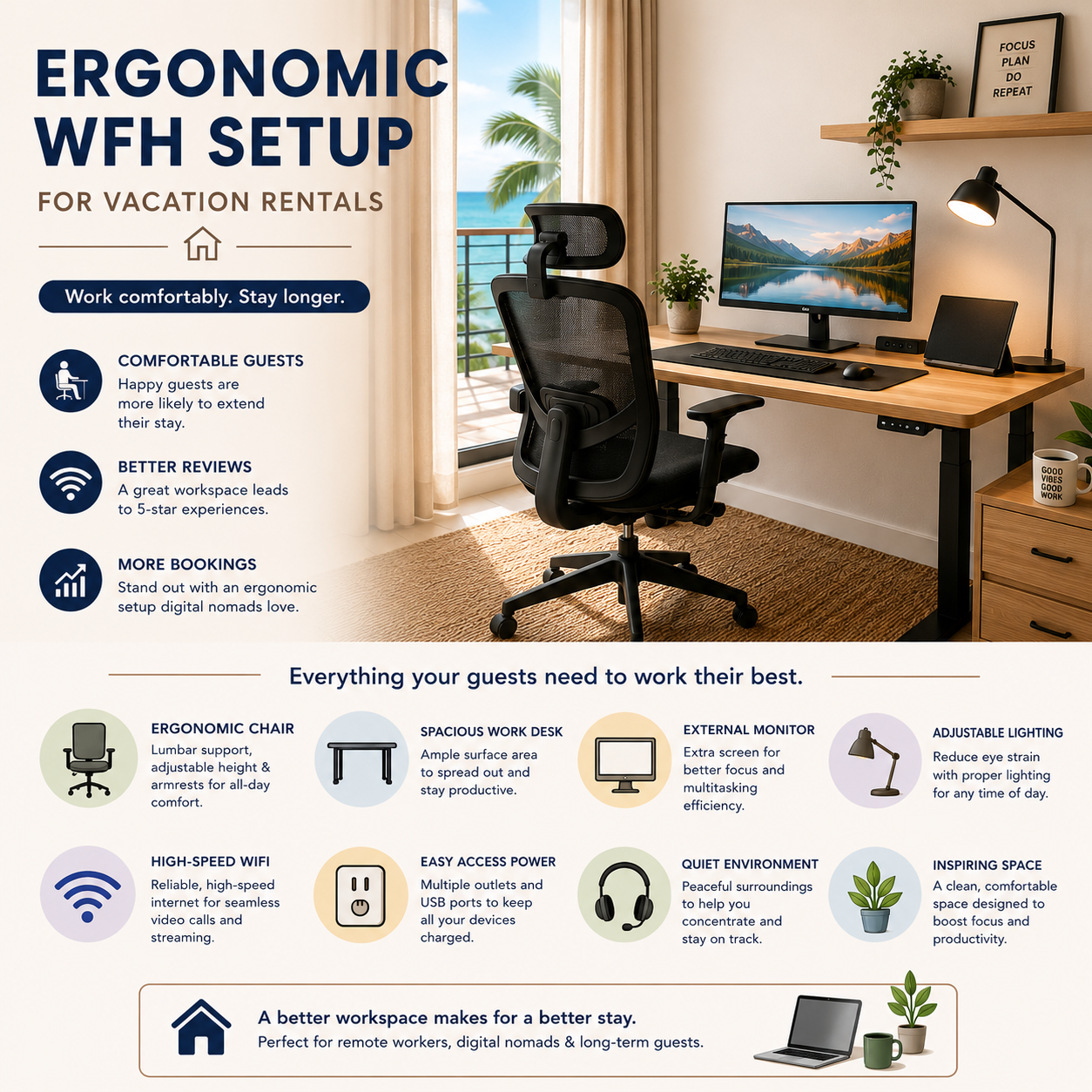
Let me paint you a picture that’s becoming all too familiar. Your guest books your beautiful beachside cottage for a week. They’re thrilled about the ocean views, the hammock on the balcony, and the promise of lazy mornings. But here’s the plot twist—they’re also planning to work remotely for three of those days. Suddenly, that charming rustic desk in the corner isn’t so charming anymore. Their back aches, their neck strains, and that “dream getaway” is starting to feel suspiciously like… well, work.
Here’s the thing—remote work isn’t going anywhere. In fact, the rise of the digital nomad has completely transformed what travelers expect from their accommodations. Your guests aren’t just looking for a place to sleep anymore. They’re looking for a work-friendly vacation rental where they can be productive without sacrificing comfort.
And that? That’s a massive opportunity for you as a host.
- Why an Ergonomic WFH Setup Matters More Than You Think
- The Anatomy of a Perfect WFH Rental Setup
- Creating a Distraction-Free Zone
- Small Touches That Make a Big Difference
- Making Your Workspace Instagram-Worthy
- Health and Wellness at the Desk
- Marketing Your WFH-Friendly Space
- Addressing Common Guest Concerns
- The Bottom Line
- Quick FAQ
Why an Ergonomic WFH Setup Matters More Than You Think
Gone are the days when a rickety dining chair and a wobbly side table qualified as a “workspace.” Today’s guests are savvier, more health-conscious, and—let’s be honest—less willing to compromise on their physical well-being. An ergonomic workspace isn’t a luxury anymore. It’s becoming a necessity.
Here’s what’s at stake:
- Guest satisfaction: A comfortable workspace = happy guests = glowing reviews
- Extended stays: With more people embracing the work from vacation lifestyle, a proper setup can attract longer bookings
- Competitive edge: In a crowded market, home office amenities make your property stand out
- Health and wellness: No one wants to return from vacation with a bad back. Your guests will thank you for caring
Plus, let’s talk about search visibility. Savvy travelers actively search for properties with “ergonomic office chair,” “dedicated workspace,” and “WFH-friendly rental.” By highlighting these features, you’re not just impressing guests—you’re climbing those search rankings.
The Anatomy of a Perfect WFH Rental Setup
Creating a comfortable workspace in your rental doesn’t require a complete renovation. It’s about thoughtful choices that make a world of difference. Here’s what actually matters:
1. The Desk: Your Guest’s Command Center
The desk is the foundation of any productive workspace. Get this wrong, and everything else falls apart.
What to look for:
- Size matters: At least 120cm x 60cm—enough space for a laptop, external monitor, notebook, and coffee mug
- Adjustable height options: Standing desks are gaining popularity. Even a simple riser can work wonders
- Sturdy construction: No wobbling, please. Your guests shouldn’t have to balance their coffee like they’re on a ship
Pro tip: Position the desk near a window. Natural light boosts productivity and makes the workspace feel less like, well, work.
2. The Ergonomic Office Chair: Your Guest’s Back Will Thank You
This is where you absolutely cannot skimp. Ergonomic seating is the single most important element of any healthy WFH setup.
Non-negotiable features:
- Adjustable seat height: Feet should rest flat on the floor
- Lumbar support: Essential for preventing back pain
- Armrests: Should allow elbows to rest at a 90-degree angle
- Swivel and mobility: Makes reaching for things easier without straining
- Breathable material: Mesh backs prevent sweating during long work sessions
Budget-friendly options: Don’t panic if you can’t afford a Herman Miller. Brands like IKEA, Steelcase, and even Amazon basics offer excellent ergonomic chairs at various price points. Just make sure it ticks the essential boxes.
3. Monitor Stand or Laptop Riser: Eye-Level Hero
Here’s a mistake I see constantly—laptops sitting directly on desks. The result? Guests hunching over, straining their necks, and developing “tech neck” before lunchtime.
Solutions:
- Adjustable monitor stand: Raises the screen to eye level
- Laptop riser: Simple, affordable, and effective
- External monitor: A game-changer for productivity (and a huge selling point)
Pro tip: Combine a riser with an external keyboard and mouse. This way, guests can keep their arms at the correct angle while maintaining good posture.
4. Good Lighting: The Productivity Booster
Poor lighting causes eye strain, headaches, and general grumpiness. Task lighting is non-negotiable.
What to include:
- Desk lamp with adjustable brightness: Preferably with warm and cool settings
- Natural daylight alternatives: LED bulbs that mimic natural light
- Evening-friendly options: Dimmer switches for relaxed evenings
Keyword alert: Guests search for “well-lit workspace” more often than you’d think. Make sure your listing mentions it.
5. Cable Management: The Unsung Hero
Tangled wires are not just ugly—they’re frustrating and unprofessional. A cable-free workspace looks polished and functions better.
Simple fixes:
- Cable clips and ties
- Under-desk cable trays
- Wireless charging pads
- Extension cords with USB ports
Your guests will appreciate not having to play detective every time they need to plug something in.
Creating a Distraction-Free Zone
Let’s be honest—working from a vacation rental comes with its own set of distractions. The ocean views are gorgeous, but they’re also… well, distracting. Here’s how to help your guests stay focused:
Designated workspace area: Ideally, the desk should be in a quiet corner, away from high-traffic zones.
Noise reduction: Consider adding:
- Thick curtains or rugs to absorb sound
- A white noise machine (surprisingly effective)
- A “Do Not Disturb” sign for their work hours
Privacy considerations: Ensure the workspace doesn’t feel exposed or overlooked. Guests should feel comfortable taking video calls without worrying about who’s watching.
Reliable Wi-Fi: This deserves its own category. High-speed internet is non-negotiable for any tech-enabled vacation rental. Consider:
- Dedicated fiber connection if available
- Wi-Fi extenders for larger properties
- A backup internet option (mobile hotspot) for emergencies
Pro tip: Include a Wi-Fi speed test card in your welcome guide. Guests appreciate transparency.
Small Touches That Make a Big Difference
Beyond the basics, it’s the little details that transform a good workspace into a guest-friendly home office. Here’s what I recommend:
Tech Amenities That Impress
Multiple power outlets: Within easy reach of the desk. No one wants to crawl under furniture to charge their devices.
Universal power adapters: Especially helpful for international guests.
External monitor: This alone can set your property apart from 90% of rentals.
Ergonomic keyboard and mouse: Wrist-friendly options show you truly care about guest comfort.
Printer/scanner: Optional but valued by business travelers.
Comfort Add-Ons That Feel Luxurious
Footrest: Simple, affordable, and surprisingly effective for posture.
Desk pad or mat: Adds a polished look and protects your furniture.
Cozy throw blanket: A little warmth during late-night work sessions.
Stress ball or fidget toy: Fun, practical, and a conversation starter.
Productivity Boosters
Whiteboard or corkboard: For jotting down ideas or to-do lists.
Office supplies: Pens, sticky notes, paper clips, and a notebook.
Water bottle: Encourages hydration during work sessions.
Healthy snacks: A small basket with nuts or granola bars is a thoughtful touch.
Making Your Workspace Instagram-Worthy
Let’s be real—guests love sharing photos of their “WFH with a view” moments. A beautifully styled workspace isn’t just functional—it’s marketing gold.
Tips for a photogenic setup:
- Keep the space clutter-free
- Add a small plant or succulent (they boost mood too!)
- Choose a desk with a natural wood finish or minimalist design
- Ensure the background is clean and visually appealing (for video calls)
Your guests will share their workspace photos on social media, and guess what? That’s free advertising for you.
Health and Wellness at the Desk
A wellness-oriented workspace shows guests you genuinely care about their wellbeing. Here’s what to consider:
Encourage movement:
- Suggest micro-breaks (there are apps for that)
- Include a small stretching guide in your welcome folder
- Recommend local walking routes for midday breaks
Promote good posture:
- Include a posture reminder card
- Provide a desk setup guide (visual instructions work best)
Support hydration:
- A large water bottle with time markers
- Herbal tea selection
Ergonomic accessories:
- Anti-fatigue mat if standing desk is available
- Wrist rest for keyboard and mouse
Marketing Your WFH-Friendly Space
Here’s the thing—if you’ve put in the effort, you need to talk about it. Your listing description, photos, and even guest communications should highlight your remote work amenities.
Keywords to weave in:
- Work-friendly vacation rental
- Ergonomic workspace
- Home office amenities
- Digital nomad accommodation
- WFH-friendly rental
- Remote work setup
- Productive workspace
- Tech-enabled vacation rental
Photos that sell:
- Wide shot of the entire workspace
- Close-up of the ergonomic chair
- View from the desk (bonus points for outdoor scenery)
- Tech details (monitors, chargers, etc.)
Addressing Common Guest Concerns
What if guests worry about distractions? Reassure them with your quiet, dedicated workspace. Mention soundproofing, privacy, and designated work hours if possible.
What about security of their devices? Provide a lockable drawer or safe nearby.
What if the Wi-Fi is unreliable? Transparency is key. Include speed test results and a backup plan.
The Bottom Line
Creating an ergonomic WFH setup in your vacation rental isn’t just about keeping up with trends—it’s about genuinely caring for your guests’ health and productivity. A well-designed workspace shows you understand the modern traveler’s needs and are willing to go the extra mile to meet them.
The results? Longer stays, better reviews, and guests who rave about your property to everyone they know. Not to mention, you’ll be tapping into the rapidly growing market of digital nomads and remote workers who are actively seeking productive getaways.
So go ahead—invest in that ergonomic chair, position that desk with a view, and watch your bookings and reviews soar. After all, when guests can work comfortably from your rental, they just might decide to stay a little longer.
And honestly? That’s a win-win for everyone. 💻🌴✨
Quick FAQ
Is an ergonomic workspace really necessary for a vacation rental? Absolutely. With remote work becoming the norm, many guests are looking for work-friendly vacation rentals. A proper setup can be the deciding factor in their booking choice.
How much does it cost to create an ergonomic workspace? It doesn’t have to break the bank. A decent ergonomic chair can cost $150-$300, and a good desk can be found for under $200. Small additions like laptop risers and good lighting add minimal cost but huge value.
Will guests actually use the workspace? More than you think! Many travelers plan to mix work and vacation—they appreciate having a comfortable space to handle emails and calls without compromising their trip.
How do I describe my workspace in my listing? Use high-ranking keywords like “ergonomic workspace,” “WFH-friendly rental,” and “dedicated home office.” Include photos and specific details about the chair, desk, and lighting.